
Visual Interactive Content Calendar
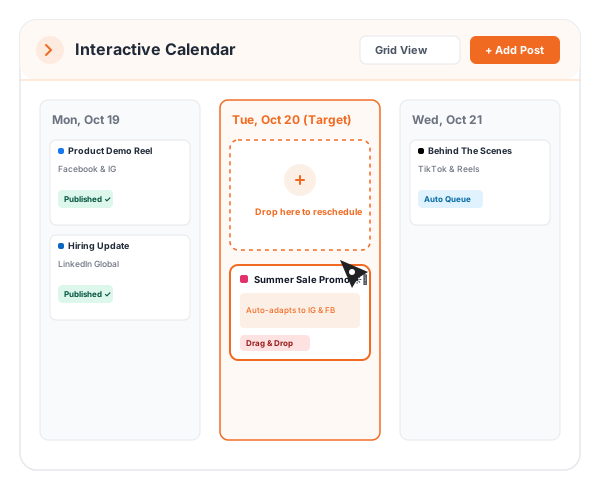
Gain total editorial clarity with drag-and-drop month, week, and day views for all your social marketing campaigns.
Engineered for Precision, Scale & Speed
Explore the core architectural capabilities powering this feature in PostNexa.

Multi-View Grid
Switch instantly between monthly overview, weekly execution, and daily timeline views.

Drag-and-Drop Rescheduling
Move scheduled posts across dates and times with instantaneous database updates.

Account & Color Filtering
Filter your calendar by specific brands, social networks, or campaign tags.
Spot Content Gaps Before They Happen
A high-level visual grid ensures your publishing cadence remains steady and balanced across all active social properties.
 Color-coded channel badges for instant clarity
- Quick-edit modal opens right from the calendar tile
- Filter by Facebook, Instagram, or YouTube with one click
Reschedule in Seconds with Zero Hassle
Need to postpone a campaign launch? Simply drag the post tile to next Tuesday and PostNexa updates the cloud queue automatically.
- Instant sync with backend cron queues
- Prevents overlapping posts on the same channel
- Preview full captions and media on tile hover
Get Started in 3 Simple Steps
From account connection to scheduled publishing, master your social distribution in minutes.
Open Editorial Calendar
Access the unified calendar from your PostNexa sidebar dashboard.
Drag & Reorganize
Drop draft posts into empty slots or reorganize existing scheduled campaigns.
Publish on Schedule
Keep your marketing team and clients aligned with a shared visual roadmap.
Related Capabilities
Explore complementary features designed to supercharge your social workflows.
Social Media Scheduling
Explore how this capability integrates seamlessly with Visual Interactive Content Calendar for maximum publishing speed.
Bulk Scheduling
Explore how this capability integrates seamlessly with Visual Interactive Content Calendar for maximum publishing speed.
Team Collaboration
Explore how this capability integrates seamlessly with Visual Interactive Content Calendar for maximum publishing speed.
Frequently Asked Questions
Yes. PostNexa allows you to filter the calendar by workspace, specific social channel, or campaign tag.
Yes. Simply click on any date or time slot in the calendar to open the composer pre-populated with that date.